Introduction
You'll probably want to provide a display device for your 6502 machine and the easiest way to do that is probably with a character-based LCD module. These are available in various sizes from 1 line of 16 characters to 4 lines of 40 characters. Some also have LED or electro-luminescent backlights to make them easier to read. Unfortunately LCD modules can be fairly expensive, but you can often find them at bargain prices from surplus electronic parts suppliers.
There is a common standard for LCD modules and you'd be unlucky if you had a module which behaved differently. It's a good idea to check the datasheet before you order, though this may not be possible if you're buying a cheap surplus device. Anyway, a 'standard' module will have a 14-pin interface (or 16-pin for a backlit device) and a Hitachi HD44780 controller chip. There are also HD44780-compatible controllers such as the Epson SED1278.
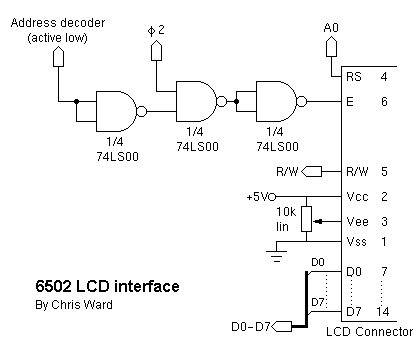
InterfaceHere's a schematic for connecting a standard LCD module to a 6502 system:
As you can see, these devices aren't too unfriendly to interface with. I'll run through the main points:
Here I will provide some code snippets to show you the basics of how to use an LCD module in your own software. For the complete HD44780 instruction set and detailed programming information do a quick web search and you should turn up many useful links.
First, some constants to go at the top of your program code. 'LCD' is the address at which your address decoder places the LCD module. 'LCD0' and 'LCD1' are then defined for access to the module's two registers. 'MSGBASE' is a two-byte location which is used to point to strings that you want to print on the LCD - I place it in my zero-page data area for speed.
ZPDATA    EQU $00             ;zero-page data area
LCD       EQU $D300           ;LCD module address

          ORG LCD
LCD0      .ds 1
LCD1      .ds 1

          ORG ZPDATA
MSGBASE   .ds 2     ;address of message to print on LCD
This function, 'LCDBUSY', will poll the LCD module to ensure it is ready to receieve a new command. It is called by most of the following functions.
; *** Wait for LCD busy bit to clear
; registers preserved
LCDBUSY   PHA
LCDBUSY0  LDA LCD0            ;read from LCD register 0
          AND #$80            ;check bit 7 (busy)
          BNE LCDBUSY0
          PLA
          RTS
Here is the function 'LINIT', which initialises the display. You will call this during your machine's reset sequence.
; *** LCD initialisation
LINIT     LDX #$04            ;do function set 4 times
LINIT0    LDA #$38            ;function set: 8 bit, 2 lines, 5x7
          STA LCD0
          JSR LCDBUSY         ;wait for busy flag to clear
          DEX
          BNE LINIT0
          LDA #$06            ;entry mode set: increment, no shift
          STA LCD0
          JSR LCDBUSY
          LDA #$0E            ;display on, cursor on, blink off
          STA LCD0
          JSR LCDBUSY
          LDA #$01            ;clear display
          STA LCD0
          JSR LCDBUSY
          LDA #$80            ;DDRAM address set: $00
          STA LCD0
          JSR LCDBUSY
          RTS
LINITMSG  fcs "LCD init done. "
          .byte $00
'LCDCLEAR' can be called whenever you want to clear the display.
; *** Clear LCD display and return cursor to home
; registers preserved
LCDCLEAR  PHA
          LDA #$01
          STA LCD0
          JSR LCDBUSY
          LDA #$80
          STA LCD0
          JSR LCDBUSY
          PLA
          RTS
This function, 'LCDPRINT', prints a single character to the LCD. You put the character code in the accumulator before calling the function. The LCD character set is similar to ASCII, but you should refer to Peer Ouwehand's page for a full listing.
Note that this function has been written for a 40 character module (40x1 or 20x2) in which the 40 characters are stored in two non-contigous blocks of 20 in the LCD's memory. The function takes care of moving between the two blocks though it doesn't wrap round at the end. You might need to adjust this for the memory layout of different types of LCD module - see the links at the end for memory maps.
; *** Print character on LCD (40 character)
; registers preserved
LCDPRINT  PHA
          STA LCD1            ;output the character
          JSR LCDBUSY
          LDA LCD0            ;get current DDRAM address
          AND #$7F
          CMP #$14            ;wrap from pos $13 (line 1 char 20)...
          BNE LCDPRINT0
          LDA #$C0            ;...to $40 (line 2 char 1)
          STA LCD0
          JSR LCDBUSY
LCDPRINT0 PLA
          RTS
The 'LCDHEX' function displays the value in the accumulator as a two-digit hex number. It makes use of the 'LCDPRINT' function, above.
; *** Print 2 digit hex number on LCD
; A, X registers preserved
LCDHEX    PHA
          LSR A               ;shift high nybble into low nybble
          LSR A
          LSR A
          LSR A
          TAY
          LDA HEXASCII,Y      ;convert to ASCII
          JSR LCDPRINT        ;print value on the LCD
          PLA                 ;restore original value
          PHA
          AND #$0F            ;select low nybble
          TAY
          LDA HEXASCII,Y      ;convert to ASCII
          JSR LCDPRINT        ;print value on the LCD
          PLA
          RTS

; *** Lookup table for HEX to ASCII
HEXASCII	fcs "0123456789ABCDEF"
'LCDSTRING' makes use of 'LCDPRINT' to display an entire string on the LCD. Before calling the function, store the address of your string in 'MSGBASE'.
; *** Print string on LCD
; registers preserved
LCDSTRING PHA                 ;save A, Y to stack
          TYA
          PHA
          LDY #$00
LCDSTR0   LDA (MSGBASE),Y
          BEQ LCDSTR1
          JSR LCDPRINT
          INY
          BNE LCDSTR0
LCDSTR1   PLA                 ;restore A, Y
          TAY
          PLA
          RTS
Here is an example of how to call the 'LCDSTRING' function.
MEMMSG1   fcs "Memory test... "
          .byte $00           ;terminating null for string

          LDA #MEMMSG1
          STA MSGBASE         ;store high byte of message address
          LDA #MEMMSG1/256
          STA MSGBASE+1       ;store low byte of message address
          JSR LCDSTRING       ;print message
Last page update: December 27, 2000.